<?xml version="1.0" encoding="utf-8"?>
<feed xmlns="http://www.w3.org/2005/Atom">
    <id>https://valen-team.github.io/zh-Hans/news/</id>
    <title>Valen Team — News</title>
    <updated>2026-11-09T00:00:00.000Z</updated>
    <generator>https://github.com/jpmonette/feed</generator>
    <link rel="alternate" href="https://valen-team.github.io/zh-Hans/news/"/>
    <subtitle>Valen Team Blog</subtitle>
    <icon>https://valen-team.github.io/zh-Hans/img/valen-mark.png</icon>
    <entry>
        <title type="html"><![CDATA[Valen-Decision-1.5：五个尺寸，支持画框，一次前向完成]]></title>
        <id>https://valen-team.github.io/zh-Hans/news/valen-decision-1.5/</id>
        <link href="https://valen-team.github.io/zh-Hans/news/valen-decision-1.5/"/>
        <updated>2026-11-09T00:00:00.000Z</updated>
        <summary type="html"><![CDATA[0.8B 到 27B 的开放决策模型，采用块结构注意力和定位头，提供原生权重、ONNX 和 GGUF 三种格式。]]></summary>
        <content type="html"><![CDATA[<p>Valen-Decision-1.5 发布，覆盖 0.8B 到 27B 五个尺寸。它回答关于文本、图片和视频的判断、选择和打分问题，现在还能在图片中框出你描述的目标。</p>
<p>每个尺寸都提供原生权重、ONNX 和 GGUF。0.8B、2B 和 4B 已上线<a href="https://huggingface.co/spaces/Valen-Team/Valen-API" target="_blank" rel="noopener noreferrer" class="">在线体验</a>和<a class="" href="https://valen-team.github.io/zh-Hans/docs/valen/api/">免费 API</a>，无需密钥，无需下载。</p>
<h2 class="anchor anchorTargetStickyNavbar_Vzrq" id="新增能力">新增能力<a href="https://valen-team.github.io/zh-Hans/news/valen-decision-1.5/#%E6%96%B0%E5%A2%9E%E8%83%BD%E5%8A%9B" class="hash-link" aria-label="新增能力的直接链接" title="新增能力的直接链接" translate="no">​</a></h2>
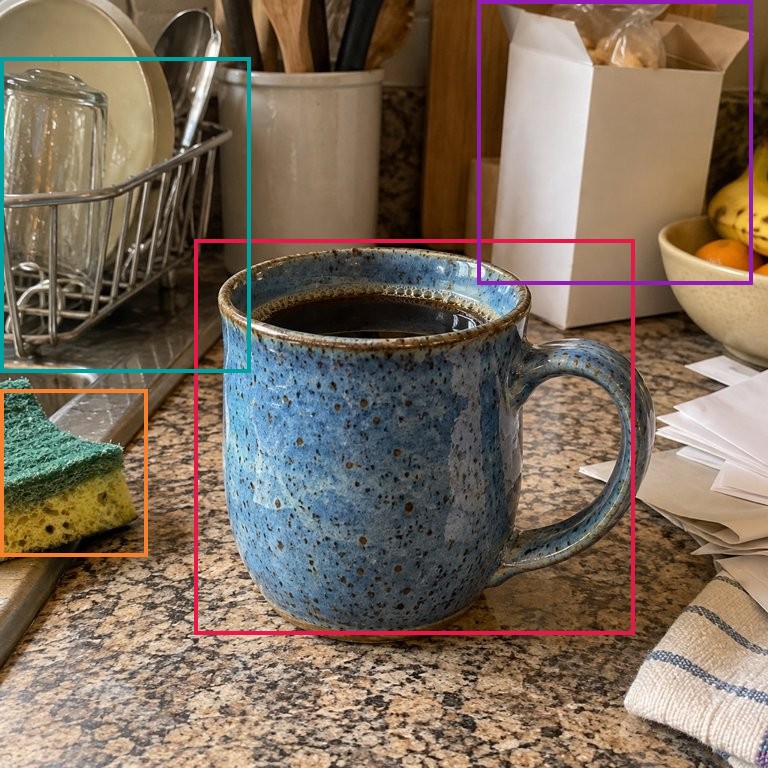
<p><strong>画框。</strong> <code>bbox</code> 问题返回目标框、中心点和置信度。它可以和判断、选择、打分问题放在同一个请求里，一次前向全部回答。详见 <a class="" href="https://valen-team.github.io/zh-Hans/docs/valen/bbox/">bbox 问题</a>。</p>
<p><img decoding="async" loading="lazy" alt="bbox 问题在台面上框出蓝色马克杯" src="https://valen-team.github.io/zh-Hans/assets/images/bbox-mug-counter-4b033f28fd2301a94ab1857cec065a33.jpg" width="768" height="768" class="img_ev3q"></p>
<p><strong>块结构注意力。</strong> 承载文本和媒体的共享前缀内部双向可见，所有问题共用一次计算。决策类问题通过同一个双向块读取前缀，每个 bbox 问题各有一个块。详见<a class="" href="https://valen-team.github.io/zh-Hans/docs/valen/architecture/#valen-decision-15">架构说明</a>。</p>
<p><strong>五个尺寸。</strong> 0.8B、2B、4B、9B 和 27B。可以先用 0.8B 在笔记本 CPU 上试，任务需要时再换更大的。<a class="" href="https://valen-team.github.io/zh-Hans/docs/valen/choosing/">如何选择版本？</a></p>
<h2 class="anchor anchorTargetStickyNavbar_Vzrq" id="jev-decision-index-成绩">Jev Decision Index 成绩<a href="https://valen-team.github.io/zh-Hans/news/valen-decision-1.5/#jev-decision-index-%E6%88%90%E7%BB%A9" class="hash-link" aria-label="Jev Decision Index 成绩的直接链接" title="Jev Decision Index 成绩的直接链接" translate="no">​</a></h2>
<p>在 <a href="https://huggingface.co/spaces/multimodalart/jev-decision-index" target="_blank" rel="noopener noreferrer" class="">Jev Decision Index</a> 0.4.1 上，Valen-Decision-1.5-27B 的公开视觉榜得分 82.9，在 83 个参评模型中排第一；公开文本榜得分 74.7，在 298 个模型中排第三。计入私有测试集的视觉总分为 73.3，排第五。名次取自 2026 年 11 月 11 日的榜单。</p>


<table><thead><tr><th>模型</th><th style="text-align:right">公开文本榜</th><th style="text-align:right">公开视觉榜</th></tr></thead><tbody><tr><td>Valen-Decision-1.5-0.8B</td><td style="text-align:right">54.71</td><td style="text-align:right">58.84</td></tr><tr><td>Valen-Decision-1.5-2B</td><td style="text-align:right">61.89</td><td style="text-align:right">70.54</td></tr><tr><td>Valen-Decision-1.5-4B</td><td style="text-align:right">69.01</td><td style="text-align:right">77.85</td></tr><tr><td>Valen-Decision-1.5-9B</td><td style="text-align:right">70.61</td><td style="text-align:right">79.93</td></tr><tr><td>Valen-Decision-1.5-27B</td><td style="text-align:right">74.66</td><td style="text-align:right">82.91</td></tr></tbody></table>
<p>分数为 0 到 100 的归一化指数。<a class="" href="https://valen-team.github.io/zh-Hans/docs/valen/decision-index/">各尺寸完整结果</a></p>
<h2 class="anchor anchorTargetStickyNavbar_Vzrq" id="选择运行方式">选择运行方式<a href="https://valen-team.github.io/zh-Hans/news/valen-decision-1.5/#%E9%80%89%E6%8B%A9%E8%BF%90%E8%A1%8C%E6%96%B9%E5%BC%8F" class="hash-link" aria-label="选择运行方式的直接链接" title="选择运行方式的直接链接" translate="no">​</a></h2>


<table><thead><tr><th>你想要</th><th>从这里开始</th></tr></thead><tbody><tr><td>在浏览器里试</td><td><a href="https://huggingface.co/spaces/Valen-Team/Valen-API" target="_blank" rel="noopener noreferrer" class="">在线体验</a></td></tr><tr><td>从代码调用</td><td><a class="" href="https://valen-team.github.io/zh-Hans/docs/valen/api/">免费 API</a></td></tr><tr><td>Python 或 JavaScript，CPU、CUDA 或 WebGPU</td><td><a class="" href="https://valen-team.github.io/zh-Hans/docs/valen/onnx/">ONNX 与 SDK</a></td></tr><tr><td>在 CPU 上起本地 HTTP 服务</td><td><a class="" href="https://valen-team.github.io/zh-Hans/docs/valen/gguf/">GGUF runtime 0.2.0</a></td></tr><tr><td>GPU 部署</td><td><a class="" href="https://valen-team.github.io/zh-Hans/docs/valen/vllm/">vLLM</a> · <a class="" href="https://valen-team.github.io/zh-Hans/docs/valen/sglang/">SGLang</a></td></tr><tr><td>用自己的数据微调</td><td><a class="" href="https://valen-team.github.io/zh-Hans/docs/valen/training/">训练指南</a></td></tr></tbody></table>
<h2 class="anchor anchorTargetStickyNavbar_Vzrq" id="获取模型">获取模型<a href="https://valen-team.github.io/zh-Hans/news/valen-decision-1.5/#%E8%8E%B7%E5%8F%96%E6%A8%A1%E5%9E%8B" class="hash-link" aria-label="获取模型的直接链接" title="获取模型的直接链接" translate="no">​</a></h2>
<ul>
<li class=""><a href="https://huggingface.co/collections/Valen-Team/valen-decision-15" target="_blank" rel="noopener noreferrer" class="">Valen-Decision-1.5 合集</a></li>
<li class=""><a href="https://github.com/Valen-Team/Valen" target="_blank" rel="noopener noreferrer" class="">源码仓库</a></li>
<li class=""><a class="" href="https://valen-team.github.io/zh-Hans/cookbook/">Cookbook</a></li>
</ul>
<p>来源：<a href="https://github.com/Valen-Team/Valen#news" target="_blank" rel="noopener noreferrer" class="">Valen 发布记录</a>。</p>]]></content>
        <author>
            <name>万澜团队</name>
            <uri>https://github.com/Valen-Team</uri>
        </author>
        <category label="模型" term="模型"/>
        <category label="发布" term="发布"/>
    </entry>
    <entry>
        <title type="html"><![CDATA[JevalKit Leaderboard 正式发布]]></title>
        <id>https://valen-team.github.io/zh-Hans/news/jevalkit-leaderboard/</id>
        <link href="https://valen-team.github.io/zh-Hans/news/jevalkit-leaderboard/"/>
        <updated>2026-10-19T00:00:00.000Z</updated>
        <summary type="html"><![CDATA[跨 Benchmark 比较决策模型，查看概率指标并下载评测结果。]]></summary>
        <content type="html"><![CDATA[<p>JevalKit 上线公开排行榜，支持浏览和比较决策模型。</p>
<p>此次发布提供 Benchmark 和模型规模筛选、模型比较、概率指标展示，以及评测结果下载。</p>
<h2 class="anchor anchorTargetStickyNavbar_Vzrq" id="统一评测流程">统一评测流程<a href="https://valen-team.github.io/zh-Hans/news/jevalkit-leaderboard/#%E7%BB%9F%E4%B8%80%E8%AF%84%E6%B5%8B%E6%B5%81%E7%A8%8B" class="hash-link" aria-label="统一评测流程的直接链接" title="统一评测流程的直接链接" translate="no">​</a></h2>
<p>JevalKit 为 8 类 Jev 相关 Benchmark 提供统一模型接口与预处理数据。发布的数据集包含 10 份 TSV 视图，其中图像和视频视图是 VisualDecisionBench 的子集。</p>
<p>目前已注册 20 个模型家族。模型注册与完整实测覆盖分别记录：排行榜区分<strong>完整评测</strong>、<strong>冒烟检查</strong>和<strong>导入预测</strong>。</p>
<h2 class="anchor anchorTargetStickyNavbar_Vzrq" id="浏览结果">浏览结果<a href="https://valen-team.github.io/zh-Hans/news/jevalkit-leaderboard/#%E6%B5%8F%E8%A7%88%E7%BB%93%E6%9E%9C" class="hash-link" aria-label="浏览结果的直接链接" title="浏览结果的直接链接" translate="no">​</a></h2>
<ul>
<li class="">按 Benchmark 与模型规模筛选。</li>
<li class="">比较模型结果和概率指标。</li>
<li class="">下载导出的评测结果。</li>
<li class="">比较分数前，查看覆盖范围和结果来源。</li>
</ul>
<p><a href="https://huggingface.co/spaces/Valen-Team/JevalKit-Leaderboard" target="_blank" rel="noopener noreferrer" class="">打开排行榜</a></p>
<h2 class="anchor anchorTargetStickyNavbar_Vzrq" id="运行评测">运行评测<a href="https://valen-team.github.io/zh-Hans/news/jevalkit-leaderboard/#%E8%BF%90%E8%A1%8C%E8%AF%84%E6%B5%8B" class="hash-link" aria-label="运行评测的直接链接" title="运行评测的直接链接" translate="no">​</a></h2>
<p>通过 <a class="" href="https://valen-team.github.io/zh-Hans/docs/jevalkit/quickstart/">JevalKit 入门指南</a>安装依赖，下载模型和数据，运行首次评测。<a class="" href="https://valen-team.github.io/zh-Hans/docs/jevalkit/benchmarks/">Benchmark 评分协议</a>介绍各测试集的评分方式。</p>
<p><a href="https://github.com/Valen-Team/JevalKit" target="_blank" rel="noopener noreferrer" class="">GitHub</a> · <a href="https://huggingface.co/datasets/Valen-Team/JevalKit_Datasets" target="_blank" rel="noopener noreferrer" class="">数据集</a></p>
<p>来源：<a href="https://github.com/Valen-Team/JevalKit#latest-updates" target="_blank" rel="noopener noreferrer" class="">JevalKit 发布记录</a>。</p>]]></content>
        <author>
            <name>万澜团队</name>
            <uri>https://github.com/Valen-Team</uri>
        </author>
        <category label="工具" term="工具"/>
        <category label="发布" term="发布"/>
    </entry>
    <entry>
        <title type="html"><![CDATA[通过 API、ONNX 和 GGUF 使用 Valen]]></title>
        <id>https://valen-team.github.io/zh-Hans/news/valen-deployment/</id>
        <link href="https://valen-team.github.io/zh-Hans/news/valen-deployment/"/>
        <updated>2026-10-13T00:00:00.000Z</updated>
        <summary type="html"><![CDATA[新增部署格式与 API Cookbook，更方便地将 Valen 决策能力接入应用。]]></summary>
        <content type="html"><![CDATA[<p>Valen 新增部署格式，并提供 API 调用文档。</p>
<p>ONNX 与 GGUF 版本已发布到 Valen Team 的 Hugging Face 组织。API Cookbook 包含预览版本以及 0.8B、2B、4B 模型的调用示例。</p>
<h2 class="anchor anchorTargetStickyNavbar_Vzrq" id="调用托管模型">调用托管模型<a href="https://valen-team.github.io/zh-Hans/news/valen-deployment/#%E8%B0%83%E7%94%A8%E6%89%98%E7%AE%A1%E6%A8%A1%E5%9E%8B" class="hash-link" aria-label="调用托管模型的直接链接" title="调用托管模型的直接链接" translate="no">​</a></h2>
<p><a href="https://valen-team.github.io/zh-Hans/cookbook/api-quickstart/" target="_blank" rel="noopener noreferrer" class="">API Cookbook</a> 包含可执行示例、输入预览和保存结果。可以先通过 <a class="" href="https://valen-team.github.io/zh-Hans/docs/valen/api/">API 入门</a>了解请求结构。</p>
<h2 class="anchor anchorTargetStickyNavbar_Vzrq" id="运行导出模型">运行导出模型<a href="https://valen-team.github.io/zh-Hans/news/valen-deployment/#%E8%BF%90%E8%A1%8C%E5%AF%BC%E5%87%BA%E6%A8%A1%E5%9E%8B" class="hash-link" aria-label="运行导出模型的直接链接" title="运行导出模型的直接链接" translate="no">​</a></h2>
<p>已发布的导出模型包含 <code>FORMAT_USAGE.md</code> 说明和专用的 <code>valen_formats.py</code> 推理入口。</p>
<p>ONNX 使用 ONNX Runtime 执行视觉主干、语言主干与 Mixer。GGUF 保留原始张量精度，采用自定义 <code>valen_qwen</code> 架构，因此需要使用随附的 Valen 推理入口。</p>
<p><a href="https://huggingface.co/Valen-Team" target="_blank" rel="noopener noreferrer" class="">浏览模型与导出格式</a></p>
<h2 class="anchor anchorTargetStickyNavbar_Vzrq" id="从源码导出">从源码导出<a href="https://valen-team.github.io/zh-Hans/news/valen-deployment/#%E4%BB%8E%E6%BA%90%E7%A0%81%E5%AF%BC%E5%87%BA" class="hash-link" aria-label="从源码导出的直接链接" title="从源码导出的直接链接" translate="no">​</a></h2>
<p>仓库提供导出、格式核验和一致性检查工具，可检查文本、图像和视频在不同执行模式下的输出一致性。</p>
<p><a href="https://github.com/Valen-Team/Valen/blob/main/scripts/README.md" target="_blank" rel="noopener noreferrer" class="">阅读导出指南</a></p>
<p>来源：<a href="https://github.com/Valen-Team/Valen#news" target="_blank" rel="noopener noreferrer" class="">Valen 发布记录</a>。</p>]]></content>
        <author>
            <name>万澜团队</name>
            <uri>https://github.com/Valen-Team</uri>
        </author>
        <category label="发布" term="发布"/>
        <category label="模型" term="模型"/>
    </entry>
    <entry>
        <title type="html"><![CDATA[Valen 0.8B、2B、4B：让决策看见世界]]></title>
        <id>https://valen-team.github.io/zh-Hans/news/valen-multimodal/</id>
        <link href="https://valen-team.github.io/zh-Hans/news/valen-multimodal/"/>
        <updated>2026-10-07T00:00:00.000Z</updated>
        <summary type="html"><![CDATA[开放多模态决策模型，以及用于图像与视频评测的 VisualDecisionBench。]]></summary>
        <content type="html"><![CDATA[<p>我们发布了 <strong>0.8B、2B、4B</strong> 三个规模的 Valen 模型，支持文本、图像与视频输入。</p>
<p>同时发布 <strong>VisualDecisionBench</strong>，用于评测基于图像和视频的决策能力。</p>
<h2 class="anchor anchorTargetStickyNavbar_Vzrq" id="结构化的决策接口">结构化的决策接口<a href="https://valen-team.github.io/zh-Hans/news/valen-multimodal/#%E7%BB%93%E6%9E%84%E5%8C%96%E7%9A%84%E5%86%B3%E7%AD%96%E6%8E%A5%E5%8F%A3" class="hash-link" aria-label="结构化的决策接口的直接链接" title="结构化的决策接口的直接链接" translate="no">​</a></h2>
<p>Valen 根据任务要求评估共享状态，对给定候选项输出概率。模型支持 Choice、Noul 和 Score 问题，为软件提供结构化决策接口。</p>
<p>仓库包含模型实现、数据处理、推理与评测命令，以及 SFT 与实验性 RLCD 训练支持。</p>
<h2 class="anchor anchorTargetStickyNavbar_Vzrq" id="模型">模型<a href="https://valen-team.github.io/zh-Hans/news/valen-multimodal/#%E6%A8%A1%E5%9E%8B" class="hash-link" aria-label="模型的直接链接" title="模型的直接链接" translate="no">​</a></h2>


<table><thead><tr><th>规模</th><th>下载</th></tr></thead><tbody><tr><td>0.8B</td><td><a href="https://huggingface.co/Valen-Team/Valen-0.8B" target="_blank" rel="noopener noreferrer" class="">Valen-0.8B</a></td></tr><tr><td>2B</td><td><a href="https://huggingface.co/Valen-Team/Valen-2B" target="_blank" rel="noopener noreferrer" class="">Valen-2B</a></td></tr><tr><td>4B</td><td><a href="https://huggingface.co/Valen-Team/Valen-4B" target="_blank" rel="noopener noreferrer" class="">Valen-4B</a></td></tr></tbody></table>
<h2 class="anchor anchorTargetStickyNavbar_Vzrq" id="visualdecisionbench">VisualDecisionBench<a href="https://valen-team.github.io/zh-Hans/news/valen-multimodal/#visualdecisionbench" class="hash-link" aria-label="VisualDecisionBench的直接链接" title="VisualDecisionBench的直接链接" translate="no">​</a></h2>
<p>完整发布评测集包含 1,696 个共享状态和 9,143 个问题，其中图像问题 2,000 个，视频问题 7,143 个。</p>
<p><a class="" href="https://valen-team.github.io/zh-Hans/benchmarks/">探索 Benchmark</a> · <a href="https://huggingface.co/datasets/Valen-Team/VisualDecisionBench" target="_blank" rel="noopener noreferrer" class="">下载数据集</a></p>
<h2 class="anchor anchorTargetStickyNavbar_Vzrq" id="开始构建">开始构建<a href="https://valen-team.github.io/zh-Hans/news/valen-multimodal/#%E5%BC%80%E5%A7%8B%E6%9E%84%E5%BB%BA" class="hash-link" aria-label="开始构建的直接链接" title="开始构建的直接链接" translate="no">​</a></h2>
<p><a class="" href="https://valen-team.github.io/zh-Hans/docs/valen/quickstart/">在本地运行 Valen</a>，或浏览<a href="https://github.com/Valen-Team/Valen" target="_blank" rel="noopener noreferrer" class="">源码仓库</a>。</p>
<p>来源：<a href="https://github.com/Valen-Team/Valen#news" target="_blank" rel="noopener noreferrer" class="">Valen 发布记录</a>。</p>]]></content>
        <author>
            <name>万澜团队</name>
            <uri>https://github.com/Valen-Team</uri>
        </author>
        <category label="模型" term="模型"/>
        <category label="数据" term="数据"/>
        <category label="发布" term="发布"/>
    </entry>
    <entry>
        <title type="html"><![CDATA[Valen 开源：探索多模态决策]]></title>
        <id>https://valen-team.github.io/zh-Hans/news/introducing-valen/</id>
        <link href="https://valen-team.github.io/zh-Hans/news/introducing-valen/"/>
        <updated>2026-09-23T00:00:00.000Z</updated>
        <summary type="html"><![CDATA[首次开放 Valen 仓库、预览模型与通用训练数据。]]></summary>
        <content type="html"><![CDATA[<p>我们开放了 Valen 源码仓库，并发布 <strong>Valen-preview-0923</strong> 预览模型与对应训练数据。</p>
<p>Valen 为 System One 决策引入视觉感知：输入文本、图片与视频，输出候选决策的概率。</p>
<h2 class="anchor anchorTargetStickyNavbar_Vzrq" id="从开放开始">从开放开始<a href="https://valen-team.github.io/zh-Hans/news/introducing-valen/#%E4%BB%8E%E5%BC%80%E6%94%BE%E5%BC%80%E5%A7%8B" class="hash-link" aria-label="从开放开始的直接链接" title="从开放开始的直接链接" translate="no">​</a></h2>
<p>仓库提供模型开发、数据处理、训练、推理和评测工具。我们希望帮助智能体理解环境、选择有用的行动，并在反馈中持续改进。</p>
<h2 class="anchor anchorTargetStickyNavbar_Vzrq" id="探索首次发布">探索首次发布<a href="https://valen-team.github.io/zh-Hans/news/introducing-valen/#%E6%8E%A2%E7%B4%A2%E9%A6%96%E6%AC%A1%E5%8F%91%E5%B8%83" class="hash-link" aria-label="探索首次发布的直接链接" title="探索首次发布的直接链接" translate="no">​</a></h2>
<ul>
<li class=""><a href="https://github.com/Valen-Team/Valen" target="_blank" rel="noopener noreferrer" class="">Valen 源码仓库</a></li>
<li class=""><a href="https://huggingface.co/Valen-Team/Valen-Preview-0923" target="_blank" rel="noopener noreferrer" class="">Valen Preview 0923</a></li>
<li class=""><a href="https://huggingface.co/datasets/Valen-Team/Valen-Training-General-100k" target="_blank" rel="noopener noreferrer" class="">General 100k 训练数据</a></li>
</ul>
<p>较新模型版本请查看<a class="" href="https://valen-team.github.io/zh-Hans/docs/valen/">模型概览</a>。</p>
<p>来源：<a href="https://github.com/Valen-Team/Valen#news" target="_blank" rel="noopener noreferrer" class="">Valen 发布记录</a>。</p>]]></content>
        <author>
            <name>万澜团队</name>
            <uri>https://github.com/Valen-Team</uri>
        </author>
        <category label="模型" term="模型"/>
        <category label="发布" term="发布"/>
    </entry>
</feed>