Bbox 问题
bbox 问题询问目标在图片中的位置。Valen-Decision-1.5 返回边界框、框的中心点和置信度,并与同一输入上的判断、选择、评分问题在同一次前向计算中完成。
Valen-Decision-1.5 的全部尺寸(0.8B 到 27B)在每种本地运行方式中都能回答 bbox 问题:
- Transformers 加载原生权重,即本页示例。
- Python 与 JavaScript SDK 加载 ONNX 模型包,见 SDK 中的 bbox 问题。
- GGUF 运行时 0.2.0,支持图片输入。
- vLLM 与 SGLang 插件。
托管 API 通过 /v1/decisions 和 /v1/systemone 回答 bbox 问题,可用 Valen-Decision-1.5 的 0.8B、2B、4B(valen-0.8b、valen-2b、valen-4b),每个请求一张图片。
请求
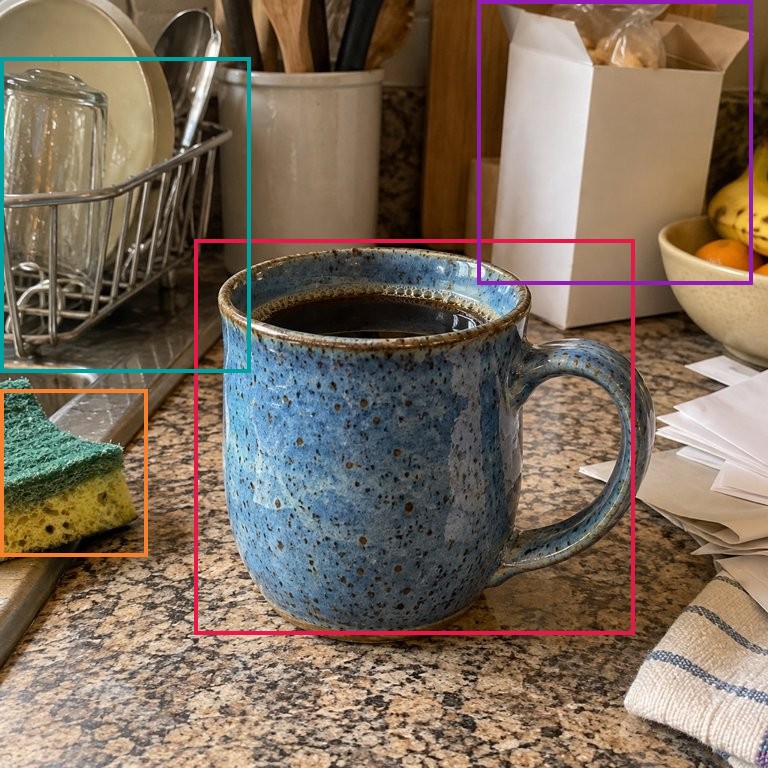
按 Transformers 本地推理加载模型,并下载示例图片:
curl -fL https://valen-team.github.io/cookbook/code/media/mug-counter.jpg -o mug-counter.jpg
加入 bbox 类型的问题。它们可以与其他类型的问题放在同一个请求里。
result = model.predict({
    "input": [{"role": "user", "content": [
        {"type": "input_image", "image_url": "mug-counter.jpg"},
    ]}],
    "questions": [
        {"name": "mug", "type": "bbox", "instructions": "The blue mug.", "image": 0},
        {"name": "sponge", "type": "bbox", "instructions": "The sponge."},
        {"name": "box", "type": "bbox", "instructions": "The white box."},
        {"name": "rack", "type": "bbox", "instructions": "The dish rack."},
        {"name": "full", "type": "predicate", "instructions": "The mug has coffee in it."},
    ],
})
for answer in result["answers"]:
    print(answer)
| 字段 | 类型 | 必填 | 说明 |
|---|---|---|---|
type | string | 是 | bbox |
instructions | string | 是 | 要定位的目标,非空文本。 |
image | integer | 否 | 要查找的图片序号,从 0 开始,按图片在输入中出现的顺序计数。默认 0。 |
name | string | Decisions 必填 | 在答案中原样返回。SystemOne 使用问题的键。 |
bbox 问题没有候选项:图像 token 就是候选项。
答案
上述请求在 Valen-Decision-1.5-0.8B 上的输出:
{
  "model": "Valen",
  "answers": [
    {"name": "mug", "type": "bbox", "bbox": [0.2533, 0.3112, 0.8276, 0.8263], "point": [0.5404, 0.5687], "confidence": 0.9467},
    {"name": "sponge", "type": "bbox", "bbox": [0.0, 0.5077, 0.1936, 0.7243], "point": [0.0968, 0.616], "confidence": 0.9226},
    {"name": "box", "type": "bbox", "bbox": [0.6213, 0.0, 0.9816, 0.3704], "point": [0.8014, 0.1852], "confidence": 0.8785},
    {"name": "rack", "type": "bbox", "bbox": [0.0, 0.075, 0.3272, 0.4854], "point": [0.1636, 0.2802], "confidence": 0.8566},
    {"name": "full", "type": "predicate", "probability": 0.9847116274944776}
  ],
  "usage": {"input_tokens": 749, "output_tokens": 0},
  "internal_usage": {"compute_tokens": 749}
}
| 字段 | 类型 | 说明 |
|---|---|---|
bbox | number[4] | [x1, y1, x2, y2],依次为左、上、右、下边界。 |
point | number[2] | [x, y],框的中心点。 |
confidence | number | 0 到 1:中心落在框内的图像 token 的概率质量。 |
坐标按原图宽高归一化到 [0, 1],原点在左上角。x 乘以图片宽度、y 乘以图片高度即得到像素坐标:在这张 768 × 768 的照片上,马克杯的框约为 [195, 239, 636, 635]。
该输出在 CPU 上以 FP32 记录,使用 torch 2.14.1 和 transformers 5.20.2;在 BF16 GPU 上末几位数值会有差异。可根据 confidence 决定是否采纳一个框。
SystemOne
SystemOne 使用相同的问题字段,以问题 ID 为键,并在同名键下返回 bbox、point 和 confidence。
result = model.predict({
    "state": {"messages": [{"role": "user", "content": [
        {"type": "image_url", "image_url": {"url": "mug-counter.jpg"}},
    ]}]},
    "questions": {
        "mug": {"type": "bbox", "instructions": "The blue mug.", "image": 0},
        "full": {"type": "noul", "instructions": "The mug has coffee in it."},
    },
})
mug = result["answers"]["mug"]
print(mug["bbox"], mug["point"], mug["confidence"])
训练目标
训练数据中,bbox 问题的目标是归一化的框 {"bbox": [x1, y1, x2, y2]}(x1 < x2、y1 < y2),或归一化的点 {"point": [x, y]}。训练记录的其余字段见数据格式,定位头如何读取图片见模型架构。